Windows 10/11 & macOS • Zero-Install Unified Helper
Numpad Connect — Wi-Fi Companion Helper
If your computer does not have Bluetooth (or when connecting from iPhone/iPad), run Numpad Connect to use both Numpad and Racing Wheel with zero latency over your local Wi-Fi network.
Tip (Computers with Bluetooth): If your computer already has Bluetooth and you use Android, no PC software is needed at all! Simply tap the top-left ᛒ Bluetooth button inside the Numpad app to pair directly via standard Bluetooth HID.
1
Extract & Run on PC
Extract the downloaded ZIP archive and run NumpadConnect.exe. (If Windows SmartScreen appears on first launch, click "More info → Run anyway".)
2
Same Local Network
Ensure your phone and computer share the same router/network (works even if your desktop PC is connected to the router via Ethernet cable, or via phone Personal Hotspot).
3
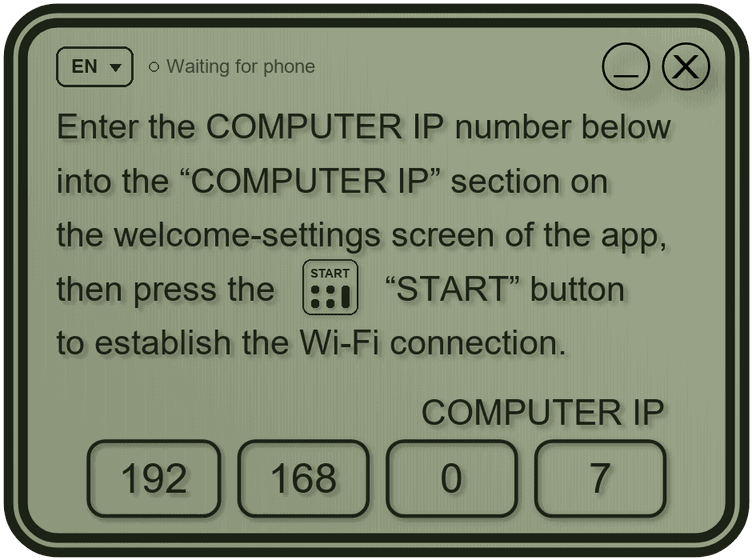
Enter the 4-Box IP & Start
Enter the 4-part COMPUTER IP address displayed on the PC window (e.g. 192.168.0.7) into the Numpad app on your phone and tap START.